You built the website, connected the payment gateway, added Google Analytics and a Meta Pixel, and started selling. Somewhere along the way, a long list of rules started applying to that website: privacy notices, cookie consent, card security, accessibility, refund information and more. Most small business owners only find out which ones when a customer complains, a payment provider asks questions or a regulator writes.
The hard part isn't that the rules are secret. It's that they depend on where your business is registered, what your site actually does and who it sells to. A Lahore clothing brand with a Meta Pixel has different obligations from a London bakery with a contact form. So we built a free website compliance checker that works that out for you: the Digital Compliance Compass.
Key takeaways
- Which digital rules apply to a website depends on three things: where the business is registered, what the site does, and where it actively sells.
- Many tracking tools are added by JavaScript after the page loads, so they don't show up when you read the page code. The Compass also checks your site in Google's real browser to find them.
- The Compass lists only the rules that need a change on your website, and tells you exactly what to change for each one.
- It's free, takes about three minutes and needs no sign-up.
In this guide
Why it's hard to know which rules apply to your website
Search for "which privacy laws apply to my website" and you'll find articles about the GDPR, the CCPA, cookie laws, accessibility laws and card security standards, often all at once. Each is real, but most of them won't apply to your particular site. Three questions decide which ones do.
- Where is your business registered? Your home country's rules always come first. A business registered in Pakistan follows Pakistani law, a UK company follows UK law, and so on.
- What does your website actually do? Taking card payments brings in PCI DSS. Running Google Analytics or a Meta Pixel brings in cookie and consent rules in many countries. Selling toys, collecting health information or sending marketing SMS each add rules of their own.
- Where do you actively sell? If you deliberately sell to customers in another market, such as the EU, some of that market's rules can apply to you as well. Shipping the odd order abroad usually isn't the same thing.
The second question is the one most owners get wrong, because they don't know everything their own website runs. Themes, apps and marketing tags add tools quietly, and many of them load only after the page has opened.
How the Digital Compliance Compass works
The Compass combines a scan of your website with a few plain questions that a scan can't answer, such as where your business is registered and whether you sell to children.
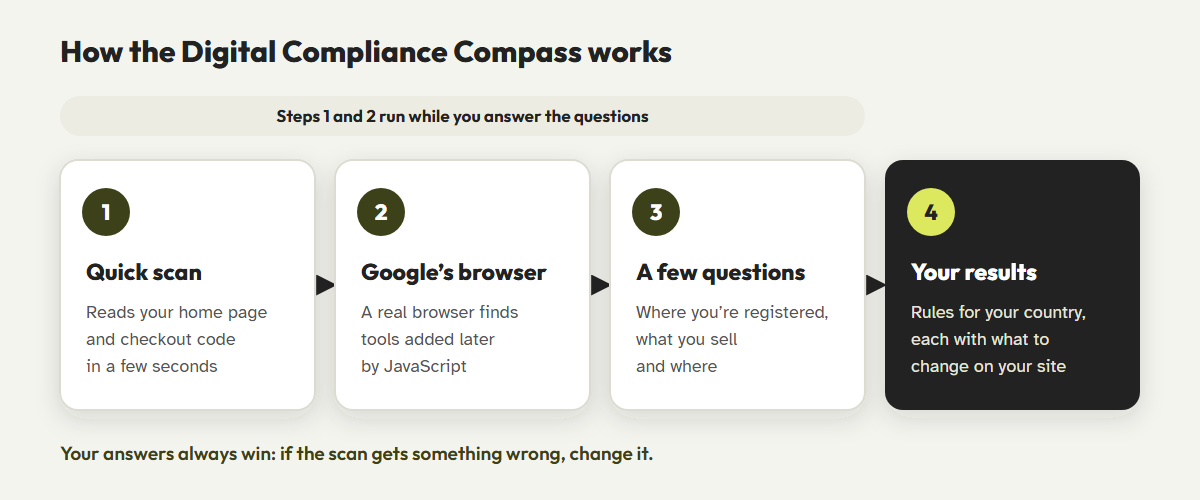
- Enter your website address.The Compass reads your public home page and, if it finds one, your cart or checkout page. In a few seconds it spots your platform, payment tools, sign-up forms, chat widgets, reviews and the trackers in your page code.
- Google's browser checks the rest.At the same time, the Compass asks Google PageSpeed Insights to open your site in a real browser and list everything it loads. That finds tools added later by JavaScript. In our tests on one large Pakistani fashion retailer, the page code showed one tracker, and Google's browser found seven, including Meta, TikTok and Snapchat pixels.
- Answer a few short questions.Where your business is registered, who your customers are, what data you collect and whether you actively sell abroad, with up to three markets. Anything the scan already found is filled in for you, and you can change it.
- Get your results.The Compass shows the rules for your home country first, then a separate section for each market you sell to.
Your answers always win. If the scan gets something wrong, change the answer. The Compass never overrides what you choose.
What your results look like
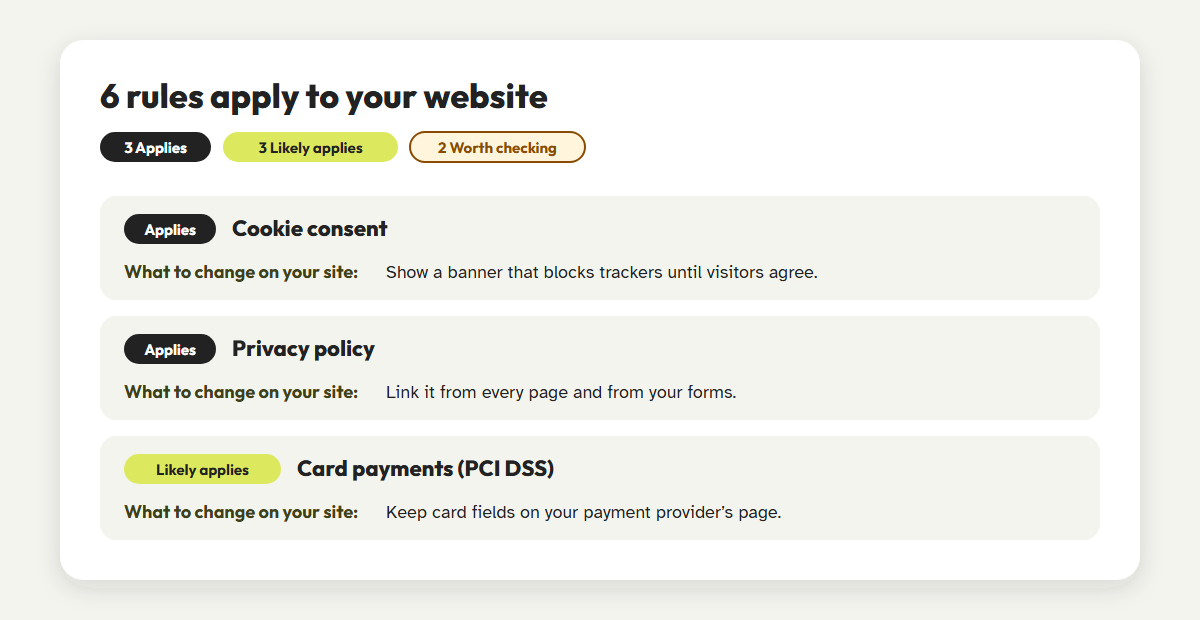
Most compliance checklists list every rule that might ever matter. The Compass does the opposite: it shows only the rules that need a change on your website, and it tells you what that change is.
| Label | What it means |
|---|---|
| Applies | Based on your answers and the scan, this rule applies to your website. |
| Likely applies | The scan found something that usually brings this rule in, such as a tracker or card form. Confirm it. |
| Worth checking | It depends on details we can't see, such as your revenue or how you handle data. Listed, but not counted. |
| Coming soon | A rule that has been passed or proposed but isn't in force yet. Listed so you can plan ahead. |
| Exempt | A rule that would apply, except that your business falls under an exemption, for example because it's small. |
You can email yourself the full report, with a source for every rule and a link to come back to it. And if you'd rather not make the changes yourself, there's a short form at the bottom to get a free quote from our team.
See which rules apply to your website
Free, about three minutes, no sign-up. Enter your website and the Compass does the rest.
Check my websiteWhat the Compass checks, and which countries it covers
The Compass looks only at rules that affect your website: what it must show, ask, block or offer. It doesn't try to cover your tax, employment or company law obligations.
| Area | Examples of what it looks at |
|---|---|
| Privacy | Privacy policy, notices on forms, data rights requests, selling or sharing data, children's data |
| Cookies and tracking | Consent banners, Google Consent Mode, session recording tools, video embeds |
| Payments and selling | PCI DSS for card payments, checkout and refund information, business contact details, subscriptions |
| Marketing | Email and SMS consent, reviews, affiliate links and endorsements |
| Accessibility | Website accessibility laws such as the European Accessibility Act and the ADA |
| Special cases | Toys and children's products, age-restricted products, health data, biometrics, AI chatbots |
It covers Pakistan, the United States (including state privacy laws), the United Kingdom and the European Union in detail, plus 14 more countries: the UAE, Saudi Arabia, Qatar, India, China, Japan, Singapore, Malaysia, Turkey, Switzerland, Canada, Brazil, Australia and South Africa. For other countries it shows the rules that apply almost everywhere, such as PCI DSS for card payments.
If accessibility comes up in your results, our guide to cleaning up a Shopify store's markup shows what that work looks like in practice.
What the Compass doesn't do
We'd rather be clear about this than oversell it.
- It isn't legal advice. It's a well-researched starting point. For a decision with real consequences, talk to a lawyer in your country.
- It doesn't certify compliance. No tool can tell you your site is compliant. The Compass tells you what to change, not that you're finished.
- It reads public pages only. It checks your home page and one checkout page, not every page or anything behind a login.
- Some sites block scanners. About one site in six in our tests blocked automated readers. Google's browser usually still gets in, and if it doesn't, you simply answer the questions yourself.
This article and the Compass give general information, not legal advice. Laws change, and how they apply depends on your business. If you need certainty, talk to a qualified lawyer.
Frequently asked questions
Is the Digital Compliance Compass really free?
Yes. The scan, the questions, the results and the emailed report are all free, with no sign-up. If you want our team to make the changes for you, you can ask for a quote, with no obligation.
Does it work for any website, or only WordPress?
Any public website. It recognizes Shopify, WooCommerce, Wix, Squarespace, Webflow, BigCommerce, Magento and others, and it works on custom-built sites too.
Why does it only show my home country's rules?
Because those are the rules that always apply to you. If you actively sell to other markets, tell the Compass which ones (up to three), and their rules appear in a separate section so they don't hide what matters most.
Do you store my website's content?
No. The Compass reads your public pages to fill in answers. It holds the page code for up to an hour while Google's check runs, then deletes it, and keeps only the scan result (what it found, not your content) for a few hours so a repeat scan is quick. If you ask for the emailed report, we save your email address and results so we can send it.
How accurate is the scan?
In our tests on 25 real websites, it identified the platform and spotted online shops correctly on every site it could read, and it didn't report trackers that weren't there. It can miss tools that load only after a visitor accepts cookies, which is why you can correct every answer.
Three minutes to know where you stand
Find out which privacy, cookie, payment and accessibility rules apply to your website, and exactly what to change.
Try the Digital Compliance CompassReferences
- Regulation (EU) 2016/679 (General Data Protection Regulation), Article 83. gdpr-info.eu; official text at eur-lex.europa.eu
- Directive (EU) 2019/882 (European Accessibility Act). eur-lex.europa.eu
- European Commission, "European Accessibility Act." commission.europa.eu
- UK Information Commissioner's Office, "Cookies and similar technologies." ico.org.uk
- Google, "EU user consent policy." google.com
- Google Ads Help, "About consent mode." support.google.com
- PCI Security Standards Council, document library (PCI DSS v4.0.1). pcisecuritystandards.org
- California Attorney General, "California Consumer Privacy Act (CCPA)." oag.ca.gov
- Google for Developers, "About PageSpeed Insights." developers.google.com