For years, accessibility work started at the home page. It's the page leadership looks at, the page that gets redesigned and, very often, the only page an audit checks in depth. That made sense when most visitors arrived through the front door. They don't anymore.
AI search tools answer a question and link straight to the page that holds the answer: a product detail page, a size guide, a returns policy, a blog post from 2021. This holiday season, more shoppers than ever will start their journey with "find me a gift for…" in an AI assistant and land several clicks deep on your site. According to the 2026 Digital Accessibility Index, those interior pages are where accessibility is weakest. This post explains what the data says about AI search UX, how it lines up with website accessibility litigation trends, and how to find and fix the pages that now matter most.
Key takeaways
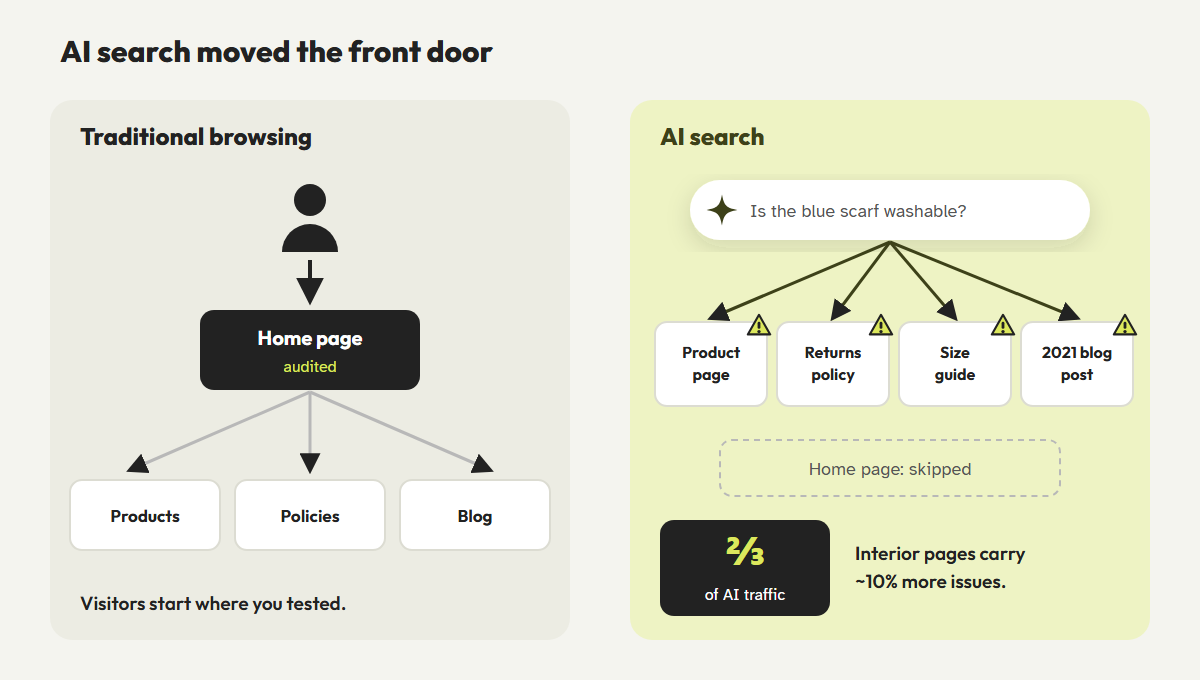
- AudioEye's 2026 Digital Accessibility Index reports that AI search engines send about two-thirds of their traffic to interior pages, not home pages.
- Interior pages average about 10% more accessibility issues than home pages, and appear in roughly 60% of 2025 accessibility claims.
- U.S. digital accessibility lawsuits are on pace for a record of around 6,000 in 2026.
- Use your analytics to find your real entry pages, then audit those, not just the home page.
In this guide
AI search moved the front door
AudioEye published its third annual Digital Accessibility Index in June 2026, based on scans of more than 165,000 pages across about 6,100 domains in the U.S. and Europe. Its central finding is about traffic patterns, not code. Citing Previsible's 2025 study of AI search referrals, it reports that AI search engines send about two-thirds of their traffic to interior pages rather than home pages.
Traditional search already sent plenty of visitors to deep pages, but AI assistants push this further. They summarize several sources and link to the most specific one. A shopper asking "Is the blue merino scarf machine washable?" won't see your home page, your mega-menu or your holiday banner. They'll arrive on a single product page and expect it to work.
Why interior pages are less accessible
The 10% gap isn't surprising once you look at how sites are built and maintained.
- Audits sample the top. Many audits test the home page and a few key templates. Thousands of individual product, article and policy pages are assumed to be fine because they share a template, even though their content isn't.
- Content comes from many hands. Product descriptions from suppliers, blog posts from past marketing teams, and policy pages pasted in from a word processor all bring their own missing alt text, skipped headings and vague links.
- Old pages don't get redesigned. A 2020 landing page may still use a theme component that has since been fixed everywhere else.
- Third-party embeds hide in the depths. Size charts, review widgets, store locators and chat tools often appear only on interior pages.
The index also found that five WCAG issue types account for about 40% of all detected issues and appear on roughly three in four pages. Each of them is the kind of problem that multiplies across a large library of interior pages.
Website accessibility litigation trends in 2026
The traffic shift lines up with the legal data. AudioEye's own litigation research, cited in the index, found that interior pages appeared in about 60% of accessibility claims filed in 2025. Plaintiffs' testers don't stop at the home page either. They try to complete a task, such as buying a product or booking a service, and document where they get stuck.
Volume is also rising. UsableNet's 2026 midyear report projects around 6,000 U.S. digital accessibility lawsuits involving websites and apps this year, about 20 to 25% more than in 2025. Roughly 80% involve e-commerce companies, and about 20% of the companies sued already had an accessibility widget or overlay installed.
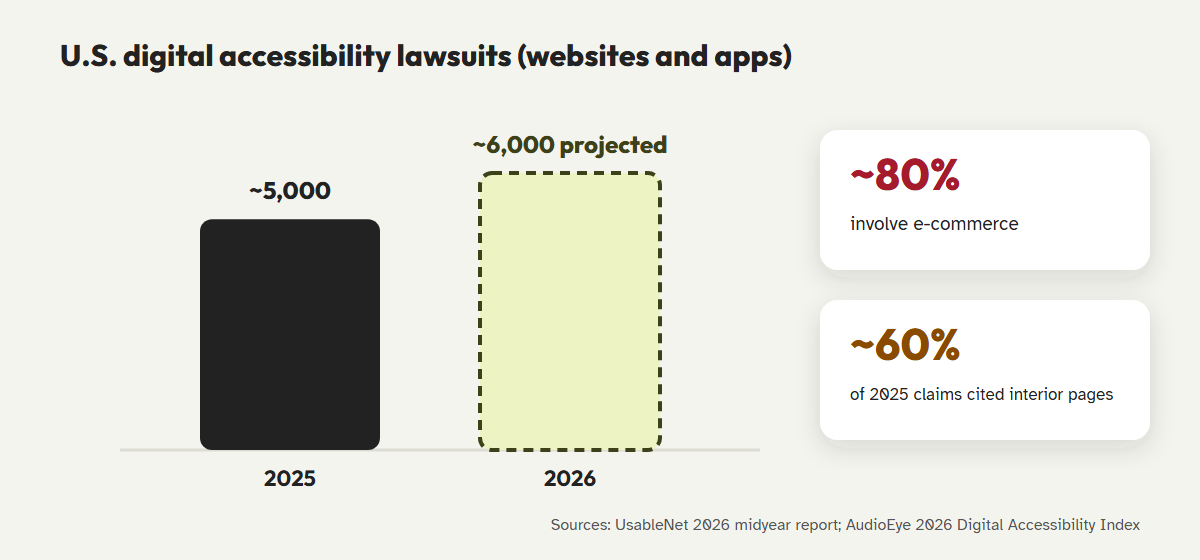
Put those trends together with holiday traffic and the risk is easy to see. More people arrive on deep pages, those pages are less accessible, and those are the pages that end up in demand letters.
High-risk WCAG failures on interior pages
Not every issue carries the same risk. The ones that matter most block a task: finding the right product, choosing an option, understanding a policy or checking out. These are the high-risk failures to look for on any page that AI search sends people to.
| Failure | Where it shows up | WCAG |
|---|---|---|
| Missing image descriptions | Product galleries, size charts saved as images, infographics in blog posts | 1.1.1 |
| Unclear link text | "Click here," "Learn more" and repeated "Shop now" links | 2.4.4 |
| Unlabeled buttons and form fields | Quantity steppers, variant pickers, wishlist hearts, newsletter fields | 1.3.1, 4.1.2 |
| Low-contrast interactive elements | Pale "Add to cart" buttons, ghost buttons, sale badges | 1.4.3, 1.4.11 |
| No way to skip navigation | Templates without a skip link, which matters more when people land mid-site | 2.4.1 |
| Missing or skipped headings | Policy and FAQ pages pasted in from documents | 1.3.1, 2.4.6 |
The skip link deserves a special mention. When someone lands on an interior page from an AI answer, the first thing a keyboard or screen reader user meets is your entire header and navigation. A skip link lets them go straight to the content they came for. Our keyboard navigation guide shows how to add one.
How to find and fix your real entry pages
You don't need to audit every page by hand. You need to know which pages people actually enter on, and fix the templates and content behind them.
- Pull your landing page report.In your analytics tool, list the top entry pages for the last 90 days. Add a segment for AI referrers such as chatgpt.com, perplexity.ai, gemini.google.com and copilot.microsoft.com.
- Run automated accessibility auditing across the whole site.A site-wide crawl finds the template-level and content-level problems that a home page scan never reaches.
- Group issues by template.A fix to the product template can repair thousands of pages at once. Fix templates first, then individual content.
- Manually test your top 20 entry pages.Use a keyboard and a screen reader to complete the task each page is for, such as choosing a size, reading the returns policy or adding to cart.
- Fix content at the source.Add alt text in your media library, replace vague links and restore headings so the fixes survive future edits.
- Re-check before peak days.Re-scan after holiday content goes live, and again before Black Friday and Cyber Monday.
Bonus: the fixes that help assistive technology users, such as clear headings, descriptive links and real text instead of images of text, also make your pages easier for AI systems and search engines to understand. Read more in our post on accessibility and technical SEO.
Audit every page, not just the home page
CoreA11y scans your whole WordPress site, groups issues by template so you fix them once, and guides you through manual checks on the pages that matter most.
Scan your whole siteAutomated vs. manual auditingFrequently asked questions
What is the 2026 Digital Accessibility Index?
It's AudioEye's third annual report on website accessibility, published in June 2026. It's based on automated scans of more than 165,000 pages across about 6,100 domains in the U.S. and Europe. Like any automated study, it measures detectable issues, so real-world barriers are likely higher.
Does AI search really bypass the home page?
For many queries, yes. AI assistants link to the most specific source for an answer, which is usually an interior page. The index cites Previsible data showing about two-thirds of AI search traffic goes to interior pages.
Which pages should I audit first?
Your top entry pages from analytics, your highest-revenue templates such as product and checkout pages, and any page tied to a key task, such as contact, returns or booking.
Is automated accessibility auditing enough for interior pages?
It's the right way to cover thousands of pages quickly, but it can't judge everything. Combine site-wide scans with manual testing of your most important entry pages.
References
- AudioEye, "AI Search Is Routing Users to the Least Accessible Pages on the Web, AudioEye's 2026 Digital Accessibility Index Finds," 25 June 2026. prnewswire.com
- AudioEye, 2026 Digital Accessibility Index announcement. audioeye.com
- UsableNet, "Digital Accessibility Lawsuits in 2026: Five Trends Companies Should Know," July 2026. blog.usablenet.com
- WebAIM, "The WebAIM Million: 2026 report." webaim.org/projects/million
- W3C, "Web Content Accessibility Guidelines (WCAG) 2.2." w3.org/TR/WCAG22
- W3C WAI, "Website Accessibility Conformance Evaluation Methodology (WCAG-EM)." w3.org