SEO teams and accessibility teams often work in separate meetings, use separate tools and report to separate managers. They're also often fixing the same problems: missing alt text, vague link text, messy heading structures, untitled pages and content that only makes sense if you can see it.
So does accessibility affect SEO? The honest answer is more interesting than a simple yes. Google says accessibility isn't a direct ranking factor. But many of the practices that make a site accessible are the same practices Google's own documentation recommends for search. Fix them once and you get a double win.
Key takeaways
- Google has said accessibility isn't a direct ranking signal, but many accessibility practices are also SEO best practices.
- Alt text, page titles, headings, link text and transcripts help both screen readers and search engines understand your content.
- Semantic HTML gives machines, including assistive technology, search crawlers and AI tools, a clear map of your page.
- Text that's visually hidden but available to screen readers doesn't hurt rankings when it's used to help users.
In this article
Does accessibility affect SEO? What Google actually says
In 2022, Google Search Advocate John Mueller said that accessibility isn't something Google measures directly for rankings, partly because it's hard to quantify. He also noted that many accessibility best practices are good SEO practices too, and that better user experiences tend to have indirect, positive effects.
That's the right way to think about it. No algorithm awards points for a Lighthouse accessibility score. Instead, accessible code makes your content easier for crawlers to understand. Accessible pages are also easier for people to use, and people who can use a page stay, convert, share it and link to it.
Plain-language version: Google doesn't rank you higher because you're accessible. It ranks you higher for many of the same things that make you accessible.
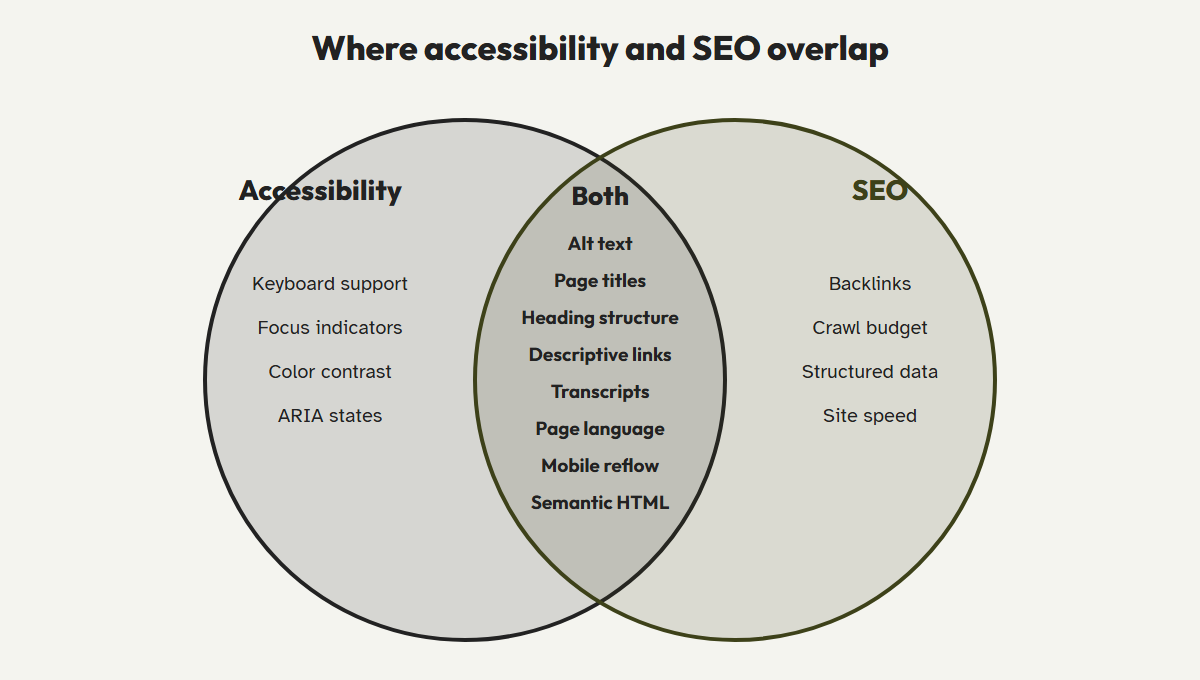
Seven places where accessibility and SEO overlap
1. Image alt text
Screen readers read alt text aloud. Google's image documentation describes alt text as the most important attribute for image metadata, and uses it with computer vision and page content to understand images. When an image is a link, its alt text also acts as the link's anchor text. Write alt text for people first. Google explicitly warns against keyword stuffing.
2. Page titles
WCAG 2.4.2 requires every page to have a descriptive title, because it's the first thing a screen reader announces. Google uses the same title element as a main source for the title link shown in search results.
3. Heading structure
Screen reader users often jump between headings to scan a page, the same way sighted users skim. A logical H1, H2, H3 outline helps them, and it gives search engines a clear picture of your topics and subtopics. That matters more as search results pull featured snippets and AI summaries from specific sections.
4. Descriptive link text
"Click here" tells a screen reader user nothing when they pull up a list of links on the page. It tells Google nothing either. Google's link guidance recommends anchor text that describes the destination page, which is exactly what WCAG 2.4.4 asks for.
5. Captions and transcripts
Captions and transcripts are required for deaf and hard-of-hearing users. They also turn the content of your video or podcast into indexable text that can rank for long-tail queries.
6. Page language
Setting the lang attribute tells screen readers which pronunciation rules to use. It also complements your hreflang setup for multilingual sites.
7. Mobile reflow and readable text
WCAG requires content to reflow at narrow widths and support 200% zoom. Pages that pass these checks are also responsive, readable pages that perform well under mobile-first indexing.
Semantic HTML benefits for SEO
Semantic HTML means using elements for what they mean rather than how they look: <nav> for navigation, <main> for the main content, <article> for a post, <button> for actions and <h2> for a section heading. Page builders often produce the opposite: deeply nested <div> elements styled to look like headings and buttons.
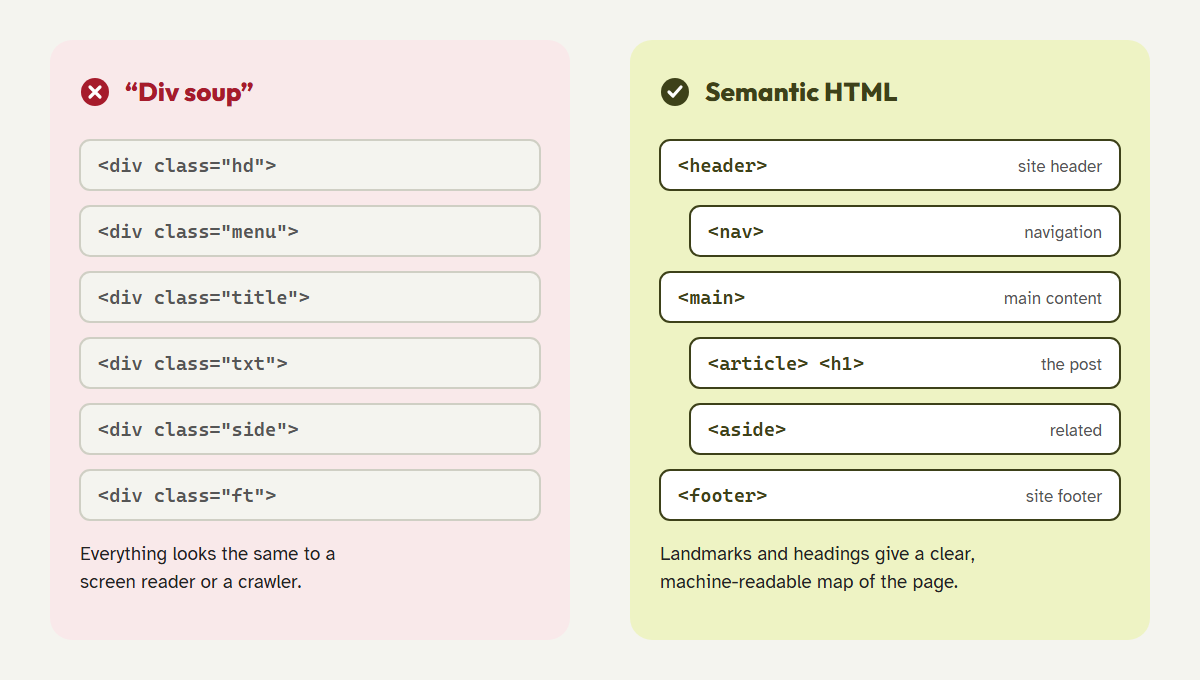
Semantic markup helps search in several practical ways:
- Clearer main content. Landmarks like
<main>and<article>separate your content from repeated menus, sidebars and footers. - Crawlable links. Google's documentation says it can reliably follow links only when they're real
<a>elements with anhrefattribute. A<div onclick>"link" is invisible to keyboards, screen readers and crawlers alike. - Better passage understanding. Real headings make it easier for search engines and AI answer engines to match a specific section of your page to a specific question.
- Lighter pages. Clean markup usually means less DOM bloat. The 2026 WebAIM Million found that the average home page now has 1,437 elements, up 22.5% in one year. Heavy pages are slower for everyone.
Screen reader optimization and Google rankings
A common worry is that screen-reader-only text, such as a visually hidden "Sale price" label or a hidden heading, looks like the hidden-text spam Google penalizes. Google has addressed this directly: Mueller has said that text hidden visually to help screen reader users isn't a problem for rankings. The difference is intent. Hidden text that helps users understand the page is fine. Hidden text stuffed with keywords to manipulate rankings isn't.
Good screen reader optimization looks like this:
- Use ARIA only when native HTML can't do the job, and keep labels short and accurate.
- Give icon-only buttons an accessible name, such as "Open search" or "Close menu."
- Don't hide your main content or headings from either audience.
- Avoid accessibility overlays that inject extra scripts and rewrite the DOM after load. They add page weight without fixing the source HTML that crawlers read.
| Fix | Accessibility benefit | SEO benefit |
|---|---|---|
| Descriptive alt text | Screen readers can describe images | Image search visibility and image link context |
| Unique page titles | Users know which page they're on | Better title links in search results |
| Logical headings | Fast navigation by heading | Clear topical structure and passage relevance |
| Descriptive link text | Links make sense out of context | Anchor text signals for the target page |
| Transcripts | Access for deaf and hard-of-hearing users | Indexable text for audio and video |
| Real links and buttons | Keyboard and screen reader support | Crawlable internal links |
A 30-minute accessibility and SEO check you can run today
You don't need a full audit to find your biggest overlap wins. Pick your five highest-traffic pages and work through this list:
- Check titles and headings.Does each page have a unique title, a single H1 and H2s and H3s that follow in order? A browser extension that shows the heading outline makes this a two-minute job.
- Review image alt text.Look for empty, duplicated or file-name alt text such as "IMG_2041.jpg". Rewrite it to describe what each image communicates.
- Scan your link text.Search each page for "click here", "read more" and "learn more", and rewrite them to name the destination.
- Test one key flow with the keyboard.Try a signup, a contact form or a checkout. If you get stuck, so does every keyboard and screen reader user.
- Run an automated scan.Use it to catch contrast, label and ARIA issues across the rest of the site, and turn the results into a prioritized fix list.
Choosing an accessibility audit tool for websites
Your SEO crawler probably already flags missing alt text and duplicate titles. An accessibility audit tool goes further: it checks contrast, form labels, ARIA usage, keyboard support and landmark structure against WCAG. When you choose one, look for:
- Site-wide scanning instead of one page at a time, so template-level issues stand out.
- Plain-language explanations so marketers and writers, not only developers, can fix content issues.
- Guided manual testing, because automated checks miss a large share of real barriers.
- Source-level fixes instead of an overlay that changes the page only in the browser.
CoreA11y was built for exactly this overlap. It scans your WordPress site for WCAG 2.2 issues, explains each one in plain language with its "?" feature, fixes common markup problems at the source and guides your team through a 32-step manual review. Your accessibility work and your technical SEO work move forward together.
Get your double win
Find the issues that hurt both your users and your search visibility, and fix them in one workflow.
Run a CoreA11y auditSee the WCAG 2.2 checklistFrequently asked questions
Is accessibility a Google ranking factor?
Not directly, according to Google's public statements. But many accessibility practices, including alt text, titles, headings, link text and crawlable links, overlap with what Google recommends for search.
Does a higher Lighthouse accessibility score improve rankings?
No. The Lighthouse accessibility score is a diagnostic tool, not a ranking signal. The fixes behind the score can still improve how users and crawlers experience your page.
Can accessibility overlays hurt SEO?
They don't fix your source HTML, which is what crawlers read, and they add extra JavaScript to every page. At best they don't help your SEO. At worst they add weight and create a false sense that the underlying issues are solved.
Should I write alt text for SEO or for accessibility?
For accessibility. Describe what the image communicates in context. That's what Google recommends too, and it naturally includes relevant terms without stuffing keywords.
References
- Search Engine Journal, "Google: Accessibility Is Not a Direct Ranking Factor," 2022. searchenginejournal.com
- Search Engine Journal, "Google: Using Hidden Text for Screen Readers Will Not Hurt Rankings." searchenginejournal.com
- Google Search Central, "Google Images SEO best practices." developers.google.com
- Google Search Central, "Link best practices for Google." developers.google.com
- Google Search Central, "Influencing your title links in search results." developers.google.com
- Google Search Central, "SEO Starter Guide." developers.google.com
- W3C, "Web Content Accessibility Guidelines (WCAG) 2.2." w3.org/TR/WCAG22
- WebAIM, "The WebAIM Million: 2026 report." webaim.org/projects/million