The holiday release is due Friday. A developer asks an AI coding assistant for a promo banner, a gift-wrap toggle and a "Notify me when back in stock" modal. Ten minutes later the components look perfect, pass the build and ship. Then the first screen reader user arrives, and the modal can't be closed, the toggle is announced as "clickable" and the banner's offer is an image with no text alternative.
AI has become part of almost every development workflow, including accessibility. But the models writing our components learned from the web as it is, and the web as it is fails accessibility checks on almost every page. This post looks at why AI accessibility tools and AI coding assistants still need a human in the loop, the real difference between automated remediation vs manual testing, and how to build an integrated accessibility strategy that keeps your digital accessibility risk footprint small during your busiest release season.
Key takeaways
- 82% of organizations say they use AI tools in their accessibility strategies, according to Level Access.
- Large language models were trained on a web where 95.9% of top home pages have detectable WCAG failures, so they reproduce the same patterns.
- AI is useful for drafting, explaining and catching some issues, but it can't confirm that a component works with a keyboard or screen reader.
- Put assistive technology testing by a person between the AI draft and the release, especially for holiday code.
In this guide
AI is everywhere in accessibility work
Level Access's State of Digital Accessibility Report for 2025–2026 found that 82% of organizations say they use AI tools in their accessibility strategies, up from 79% a year earlier. Its 2026–2027 edition puts the share of professionals using AI for accessibility work at about 80%, but notes that no single use case has been adopted by more than a third of them. In other words, almost everyone is experimenting, and nobody has a single answer.
That's not a reason to avoid AI. Used well, it can explain a WCAG criterion in plain language, draft alt text for a human to edit, suggest ARIA patterns and speed up fixes across a large codebase. The risk is treating its output as finished and accessible because it looks finished.
Trained on a broken web
Large language models learn to write code by studying huge amounts of existing code and web pages. The trouble is what that code looks like. The 2026 WebAIM Million found detectable WCAG failures on 95.9% of the top one million home pages, with an average of 56.1 errors per page. And those are only the errors an automated tool can detect.
So when an assistant generates a dropdown, a modal or a product card, it reproduces the most common way those components are built, which is often the inaccessible way. WebAIM's authors went further. They suggested that the rise in errors since 2025 likely reflects changes such as automated and AI-assisted coding practices. That's an explanation, not a measured finding, but it points to a feedback loop. AI learns from inaccessible code, generates more of it, and that code becomes part of the web future models learn from.
The same report found that home pages using ARIA averaged 59.1 errors, compared with 42 on pages without it. ARIA isn't bad, but it's easy to misuse, and AI assistants tend to add it generously.
Where AI-generated code fails
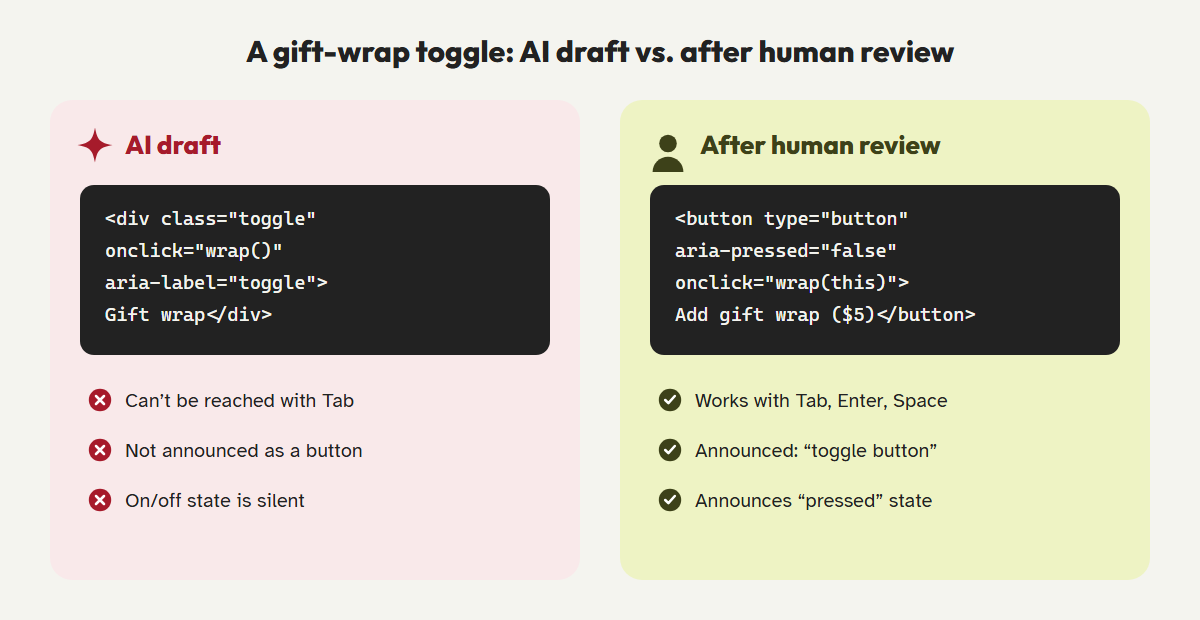
The pattern is consistent: AI-generated components usually look right and often pass a quick automated scan, but break in ways only a keyboard or screen reader test reveals.
| Pattern | What it looks like | What a user experiences |
|---|---|---|
<div onClick> buttons | A styled box that works with a mouse | Can't be reached with Tab or activated with Enter or Space |
| ARIA added on top of the wrong element | role="button" or aria-label sprinkled liberally | Conflicting or misleading announcements, missing keyboard support |
| Modals without focus management | An overlay that appears and disappears | Focus stays behind the modal, and Escape does nothing |
| Placeholder-only inputs | Clean, minimalist forms | Fields have no reliable name, and the hint vanishes while typing |
| Generic alt text | alt="image" or alt="product photo" | Passes a scanner, says nothing useful |
outline: none | A "cleaner" look with no focus ring | Keyboard users can't see where they are |
Each of these is easy to fix once someone notices it. The problem is that nobody notices if the only reviewer is another automated tool.
The myth of the all-in-one AI fix
The same promise shows up every year: install one AI-powered tool and your site becomes compliant. It's appealing, especially in November. It's also not how accessibility works.
Automated tools, AI-powered or not, can only judge what they can measure. Studies of automated testing consistently find that a large share of real barriers needs human judgment. Whether alt text is accurate, whether focus order makes sense, whether an error message is understandable and whether a custom widget actually works with a screen reader all fall into that share. In 2025 the U.S. Federal Trade Commission ordered accessiBe to pay $1 million over claims that its AI-powered tool could make any website compliant. And UsableNet reports that about 20% of companies sued over digital accessibility in 2026 already had a widget or overlay installed.
| AI and automated tools | Human testing with assistive technology | |
|---|---|---|
| Speed and scale | Excellent: thousands of pages in minutes | Slower: focused on key journeys |
| Missing attributes and contrast | Strong | Strong |
| Whether a widget works with a keyboard | Weak | Strong |
| Whether alt text and labels are meaningful | Weak: can guess, can't confirm | Strong |
| Real-world usability | Can't judge | Strong, especially with disabled testers |
| Evidence for legal or procurement purposes | A scan report | Documented test results tied to WCAG criteria |
The answer isn't AI or humans. It's AI and humans, each doing what they're good at.
A human-in-the-loop workflow for holiday releases
Holiday code is a special risk. It's written fast, often by people outside the core team, and shipped under pressure just before your highest-traffic weeks. Build accessibility checkpoints into the path from AI draft to production.
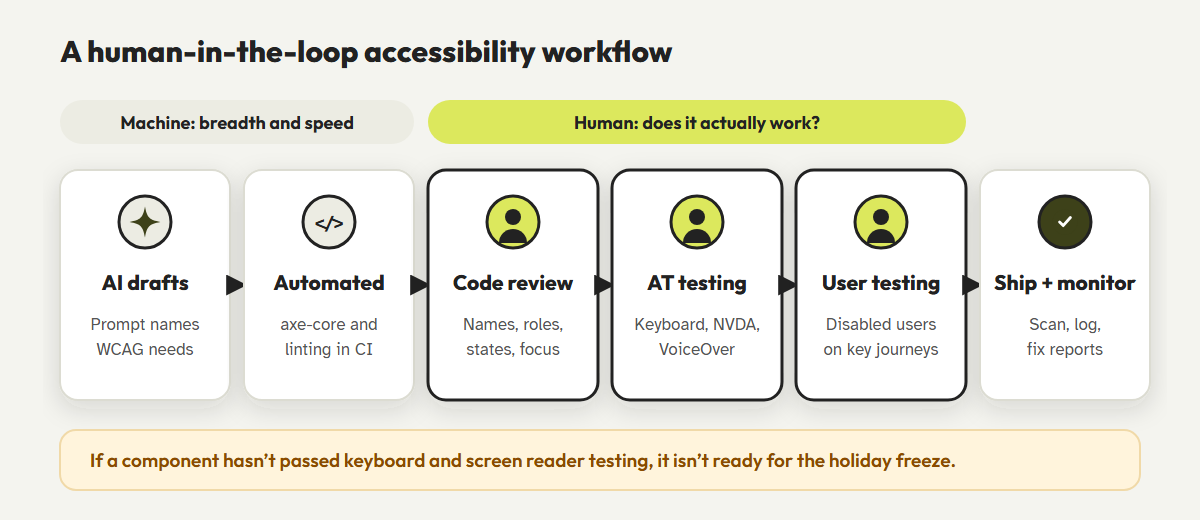
- Prompt for accessibility.Ask for native HTML elements, visible labels, focus management and WCAG 2.2 AA explicitly. You'll get better drafts, but you still can't assume they're correct.
- Automate the basics in CI.Run axe-core or a similar engine and an accessibility linter on every pull request, and block merges on new failures.
- Review like it's a security change.A reviewer checks interactive components against a short checklist: native elements, names, roles, states, focus and error handling.
- Test with assistive technology.Before merging, someone completes the component's task with only a keyboard and then with NVDA or VoiceOver. It takes minutes per component.
- Include disabled users for key journeys.For checkout, account and booking flows, usability testing with people who use assistive technology every day finds problems no checklist will.
- Document and monitor.Record what was tested and when, scan production after release, and give customers a clear way to report barriers.
<!-- Prompt the assistant with requirements, then verify by hand -->
"Build a back-in-stock modal using the native <dialog> element.
 Requirements: visible label on the email field, autocomplete="email",
 focus moves into the dialog on open and returns to the trigger on close,
 Escape closes it, the close button has an accessible name,
errors are announced. Target WCAG 2.2 AA."Freeze early. If a component can't go through keyboard and screen reader testing before your holiday code freeze, it isn't ready, however good it looks.
Automation for breadth, people for depth
CoreA11y combines automated WCAG 2.2 scanning and source-level fixes with a guided 32-step manual review, so your team can test what AI can't before you ship.
Start a guided auditSee what scanners missFrequently asked questions
Can AI coding assistants write accessible code?
Sometimes, especially when you prompt them with specific requirements. But they often reproduce common inaccessible patterns, so every interactive component still needs keyboard and screen reader testing by a person.
Are AI accessibility tools worth using?
Yes, as part of an integrated strategy. They're useful for scanning at scale, explaining issues, drafting alt text and suggesting fixes. They shouldn't be the only check, and no tool can make a site compliant on its own.
What's the minimum manual testing before a release?
For every new or changed interactive component: complete its task with a keyboard only, then with a screen reader, check zoom to 200%, and confirm that errors and status messages are announced.
How do I reduce my digital accessibility risk footprint quickly?
Focus on high-traffic, task-critical journeys such as product pages, cart, checkout and account. Fix blockers there first, document your testing and set up continuous scanning to catch regressions.
References
- Level Access, "State of Digital Accessibility Report 2025–2026: Exploring our findings." levelaccess.com
- Level Access, "Executive Summary: The Eighth Annual State of Digital Accessibility Report," 2026. levelaccess.com
- WebAIM, "The WebAIM Million: 2026 report." webaim.org/projects/million
- U.S. Federal Trade Commission, "FTC Approves Final Order Requiring accessiBe to Pay $1 Million," April 2025. ftc.gov
- UsableNet, "Digital Accessibility Lawsuits in 2026: Five Trends Companies Should Know," July 2026. blog.usablenet.com
- UK Government Digital Service, "What we found when we tested tools on the world's least-accessible webpage," 2017. accessibility.blog.gov.uk
- W3C, "ARIA in HTML: First rule of ARIA use." w3.org/TR/html-aria
- Deque Systems, axe-core on GitHub. github.com/dequelabs/axe-core