A few years ago, the pitch sounded perfect: paste one line of JavaScript into your site, and an AI-powered toolbar makes it accessible and "ADA compliant" overnight. Thousands of businesses bought in. In 2026, many of those same businesses are learning the hard way that an overlay did not keep them out of court. Some were sued because of what the overlay missed.
If you run a WordPress site and a widget like this is installed, this guide explains why the accessibility overlay lawsuit trend keeps growing, why website overlays fail the people they claim to help, and what actually lowers your legal risk.
Key takeaways
- More than 5,000 digital accessibility lawsuits were filed in the U.S. in 2025, and roughly 1,400 of them targeted sites that already had an accessibility widget installed.
- In 2025 the FTC fined a leading overlay vendor $1 million for claiming its tool could make any website WCAG compliant.
- Overlays change what visitors see in the browser. They don't repair the underlying HTML, which is what screen readers, keyboards and auditors actually read.
- Real risk reduction comes from fixing source markup, testing manually and documenting your work.
In this article
What is an accessibility overlay?
An accessibility overlay is a third-party script that loads on top of your website. It usually shows up as a floating icon that opens a toolbar with options like bigger text, high contrast, a "dyslexia-friendly" font or a "screen reader mode." Many vendors also claim the script uses AI to scan every page and fix problems automatically as the page loads.
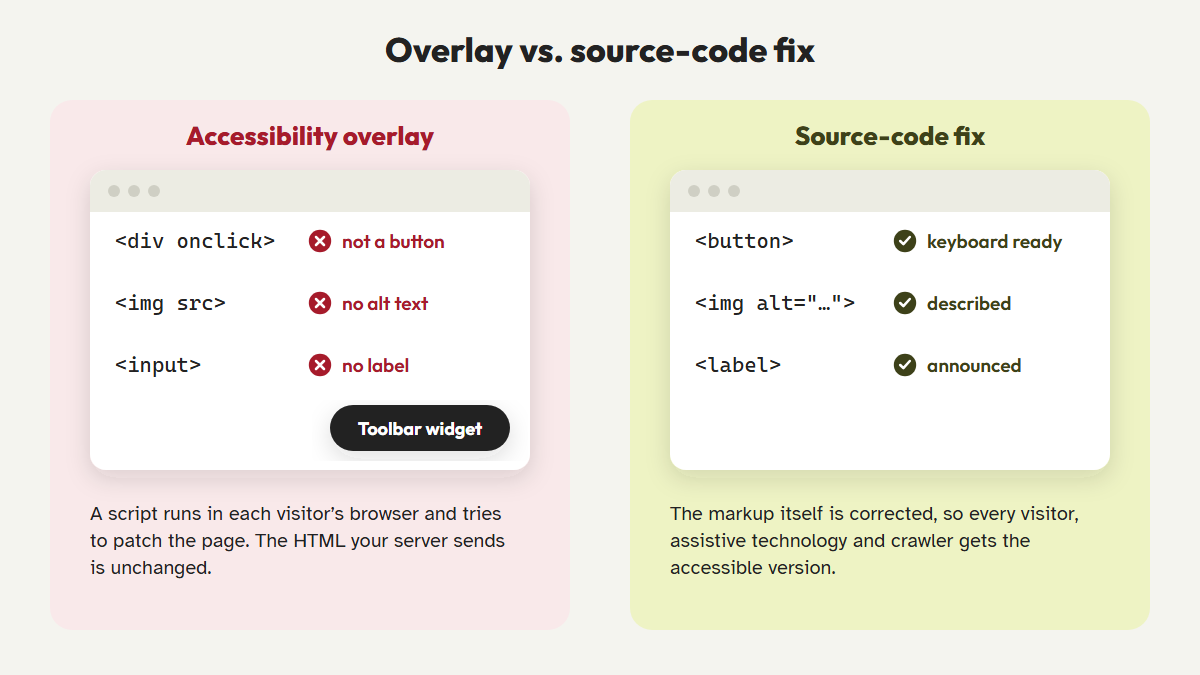
The appeal is easy to see: no developer, no code changes and a monthly fee that looks cheaper than an audit. The problem is that the script works on a copy of your page inside each visitor's browser. Your theme, your plugins and the HTML your server sends all stay exactly as they were.
The accessibility overlay lawsuit numbers for 2025 and 2026
Web accessibility lawsuits in the U.S. are usually filed under Title III of the Americans with Disabilities Act (ADA), which courts in many jurisdictions have applied to websites. UsableNet, which tracks these filings every year, counted more than 5,000 digital accessibility lawsuits in 2025 across federal courts and New York and California state courts.
The detail that matters most here is in UsableNet's monthly breakdown. Lawsuits against companies that were already running a widget stayed steady all year, at roughly 1,400 in total. UsableNet's own conclusion is blunt: widgets do not materially reduce legal risk.
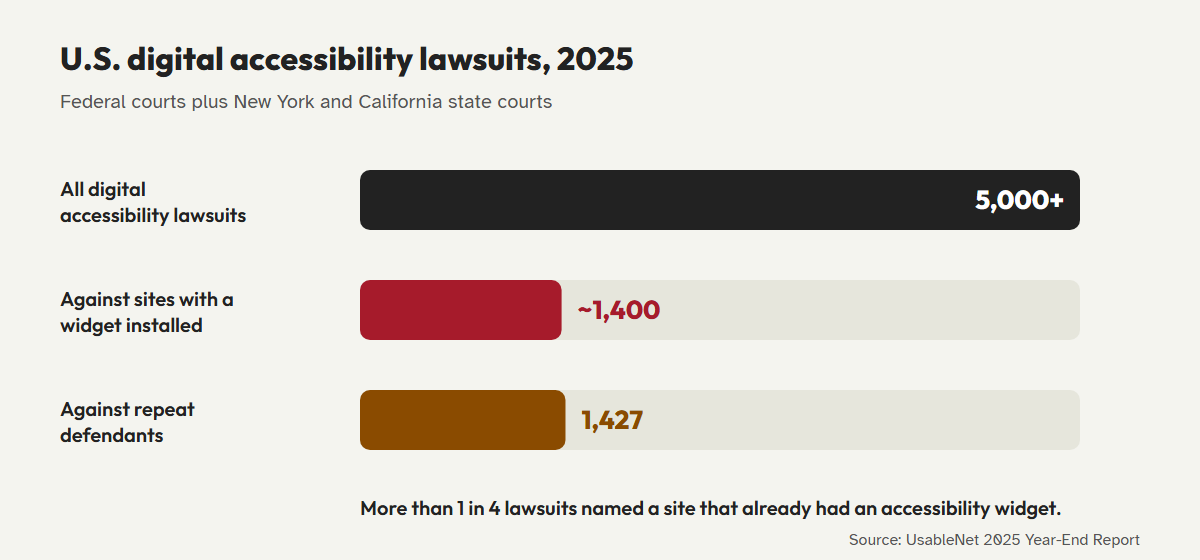
Overlays can also add risk. Plaintiffs' firms use the same automated scanners everyone else does, and a visible toolbar tells them the site owner knew about accessibility. When the toolbar fails a real screen reader user, that becomes evidence. The 1,427 repeat defendants are a reminder that settling once doesn't protect you if the underlying code never changes.
The FTC's $1 million warning shot
In January 2025, the U.S. Federal Trade Commission (FTC) brought a complaint against accessiBe, one of the best-known overlay vendors. The FTC alleged that the company's claims that its AI tool could make any website compliant with the Web Content Accessibility Guidelines (WCAG) were false, misleading or unsupported. It also alleged that the company had passed off paid reviews as independent ones.
The final order, approved in April 2025, required accessiBe to pay $1 million. It bars the company from claiming that its automated products can make a website WCAG compliant, or keep it compliant over time, without evidence to back up the claim.
What this means for you: if a vendor promises "instant compliance" or "lawsuit protection," ask for evidence. A U.S. regulator has already ruled that claims like this need proof, and the ADA puts responsibility on the site owner, not the vendor.
Why website overlays fail
The legal record follows a technical one. Hundreds of accessibility practitioners have signed the Overlay Fact Sheet, which calls on businesses to stop relying on these tools. Their reasons come up again and again in real testing.
1. They don't change your source code
Screen readers, voice control software and search engines read the Document Object Model (DOM) that your theme produces. An overlay tries to patch that DOM after it loads, often with guesses. If your "Add to cart" button is a <div> with no role or label, a script can't reliably work out what it does or how it should behave.
2. They conflict with the assistive technology people already use
People with visual disabilities already have screen readers they know well, such as JAWS, NVDA or VoiceOver. Low-vision users already have zoom and contrast settings in their operating system. An overlay's "screen reader mode" can override those settings, announce content twice or steal keyboard focus. Many disabled users report that overlays make sites harder to use, not easier.
3. They can't make judgment calls
Writing a useful alt text for a product photo, choosing a logical heading structure or deciding whether a carousel should autoplay all depend on context. AI-generated alt text like "image of a person" technically fills an empty attribute, but it doesn't meet the intent of WCAG.
4. They create a false sense of security
The biggest cost of an overlay is often the work it delays. While the widget is running, nobody is fixing the theme, retraining content editors or testing checkout with a keyboard. Meanwhile, the 2026 WebAIM Million report found detectable WCAG failures on 95.9% of the top one million home pages, with an average of 56.1 errors per page.
The bigger issue: automated web accessibility problems
Overlays are one form of a broader mistake: treating accessibility as something software can fully automate. Automated checks are valuable, and they find many common errors quickly. But research consistently shows they find only part of the picture.
- The UK Government Digital Service built a test page with 143 accessibility barriers. Every tool it tested combined found about 71% of them, and the best single tool found about 40%.
- Deque, the company behind the open-source axe-core engine, found that automated tests caught about 57% of issues by volume across more than 2,000 real audits.
- Keyboard traps, confusing focus order, unclear error messages and meaningless alt text usually need a human to spot them.
So even a perfectly built automated tool leaves a gap that only manual testing closes. An overlay that promises to close that gap on its own is selling something the technology can't deliver. We go deeper on this in our guide to automated vs. manual accessibility auditing.
What real WCAG lawsuit protection looks like for WordPress
No tool, plugin or audit can guarantee that you will never be sued. Anyone can file a lawsuit. What you can control is whether your site is genuinely usable, and whether you can show a good-faith, documented effort to meet WCAG 2.2 Level AA. That's what tends to matter when a demand letter arrives.
Looking for a replacement? See how CoreA11y compares in our accessibility overlay alternative guide.
- Remove the overlay and audit what's underneath.Run an automated scan on your key templates: home, blog post, product, cart, checkout, contact form. Note every error and where it comes from: theme, plugin or content.
- Fix the markup at its source.Add real labels to form fields, write meaningful alt text, restore visible focus outlines, add a skip link and use real
<button>elements. These fixes help every visitor, whether or not JavaScript loads. - Test manually with a keyboard and a screen reader.Tab through every important page flow. Try NVDA on Windows or VoiceOver on Mac. This is where you catch the issues automated tools miss.
- Publish an accessibility statement.Describe the standard you're aiming for, the known limitations and how people can contact you if something doesn't work for them.
- Document and repeat.Keep dated records of your audits and fixes. Re-test whenever you change themes, add plugins or redesign a template.
Where CoreA11y fits: CoreA11y was built as the opposite of an overlay. Instead of putting a toolbar over broken code, it corrects the markup your WordPress site actually serves, explains each WCAG rule in plain language with its "?" help feature, and pairs automated checks with a guided 32-step manual review so you can document real progress.
Laws to keep on your radar
Accessibility obligations are widening beyond ADA lawsuits. The European Accessibility Act has applied to many e-commerce and digital services sold in the EU since 28 June 2025. In the U.S., the Department of Justice's ADA Title II rule requires state and local government websites to meet WCAG 2.1 AA. In April 2026 the deadline was extended to April 2027 for larger entities and April 2028 for smaller ones. None of these frameworks accepts an overlay as a substitute for accessible content.
Replace the overlay with real fixes
CoreA11y finds and corrects accessibility issues in your WordPress markup, explains every rule in plain language and walks you through the manual checks that scanners miss.
Try MSACAlab Accessibility CheckerRead the WCAG 2.2 checklistFrequently asked questions
Can I be sued if I have an accessibility overlay installed?
Yes. UsableNet's 2025 data shows roughly 1,400 lawsuits against sites that already had an accessibility widget. An overlay doesn't exempt a site from the ADA or from WCAG-based claims.
Is it safe to just uninstall my overlay?
Removing it won't make your site less accessible to people using their own assistive technology, and many will find it easier to use. Start your source-code fixes and manual testing at the same time so you can show active progress.
Are all automated accessibility tools bad?
No. Automated scanners like axe-core, WAVE and Lighthouse are excellent at catching common errors quickly. The problem is relying on automation alone, or on tools that change the page in the browser instead of fixing the code.
Does WordPress have built-in accessibility?
WordPress core follows accessibility standards, and themes tagged "accessibility-ready" meet a baseline review. But plugins, page builders and your own content can still introduce barriers, so you still need to test your actual site.
This article is general information, not legal advice. If you have received a demand letter or lawsuit, talk to a qualified attorney.
References
- UsableNet, "ADA Web Lawsuit Trends for 2026: What 2025 Filings Reveal." blog.usablenet.com/ada-web-lawsuit-trends-2026
- UsableNet, "2025 Year-End Digital Accessibility Lawsuit Report" (PDF). info.usablenet.com
- U.S. Federal Trade Commission, "FTC Approves Final Order Requiring accessiBe to Pay $1 Million," April 2025. ftc.gov
- Overlay Fact Sheet. overlayfactsheet.com
- WebAIM, "The WebAIM Million: The 2026 report on the accessibility of the top 1,000,000 home pages." webaim.org/projects/million
- UK Government Digital Service, "What we found when we tested tools on the world's least-accessible webpage," 2017. accessibility.blog.gov.uk
- Deque Systems, "Automated Testing Study Identifies 57 Percent of Digital Accessibility Issues." deque.com
- W3C, "Web Content Accessibility Guidelines (WCAG) 2.2." w3.org/TR/WCAG22
- Directive (EU) 2019/882, the European Accessibility Act. eur-lex.europa.eu
- Level Access, "The ADA Title II and Section 504 Extensions: What They Don't Change," May 2026. levelaccess.com