Cookie settings

Choose which cookies we may use. You can change this at any time with "Cookie settings" at the bottom of every page.

Necessary

Always on

Needed for the site to work and to remember your cookie choice. They don't track you, so they are always on.

See the cookies
CookieSet byWhat it doesLasts
corea11y_consentCoreA11yRemembers your cookie choice6 months
wordpress_*, wp-settings-*WordPressOnly if you log in to this site: keeps you logged inSession to 1 year

Google Analytics counts visits and shows which pages help people, so we can improve the site. It tells us about pages and devices, not who you are. We don't use it for ads.

See the cookies
CookieSet byWhat it doesLasts
_gaGoogleTells visits apart2 years
_ga_*GoogleKeeps track of a visit2 years

Read how we use cookies in our privacy policy

CoreA11y / Web accessibility

Make your website work for everyone

CoreA11y audits your site against WCAG 2.2 AA, fixes what is safe to fix, shows you exactly what needs your hands, and proves your progress with before-and-after reports. Every fix has an undo.

  • Powered by axe-core
  • No overlay script
  • Nothing leaves your site
  • Undo for every fix

CoreA11y / Products

Accessibility for your website, store, PDFs and apps

Start free on WordPress, Squarespace or Wix today. The rest are on the way, and our team can already help with any of them by hand.

  • Available now

    MSACAlab Accessibility Checker

    A WordPress plugin that audits every page against WCAG 2.2 AA, turns on safe quick fixes in one click with an undo for each, and proves your progress with before-and-after reports.

    • Free version
    • 12 free quick fixes
    • Pro from $19 a month
  • Free tool

    Digital Compliance Compass

    A free check that shows which privacy, cookie, payment and accessibility rules apply to your website, and exactly what to change.

    • Free
    • Privacy
    • Cookies
    • Accessibility
  • Service

    Expert audits

    Rather have experts do it? MSACAlab audits your site by hand against WCAG 2.2 AA, from $89, and can fix what we find.

    • From $89
    • WCAG 2.2 AA
    • Done by experts
  • Coming soon

    PDF Remediation

    Make reports, forms, menus and brochures in PDF accessible to PDF/UA and WCAG. Fix them yourself with our tool, or let our team do it for you.

    • PDF/UA
    • WCAG
    • Tool or service
  • Coming soon

    CoreA11y for Shopify

    Audit your storefront and turn on quick fixes from your Shopify admin, with an undo for every change.

    • Quick fixes
    • Undo for every change
  • Coming soon

    Mobile App Audit

    Expert accessibility testing for iOS and Android apps, with clear fixes your developers can act on.

    • iOS
    • Android
  • Available now

    CoreA11y for Squarespace

    Audit your Squarespace site, turn on quick fixes and get Squarespace steps for the rest. Free plan available.

    • Quick fixes
    • Clear reports

CoreA11y doesn't just audit. It fixes the code your visitors get.

Many checkers stop at a list of problems. CoreA11y repairs what is safe to repair in your site's markup, queues the rest for your approval, and guides you through the few things only a person can do.

CoreA11y / Audit report

A report anyone on your team can read

A score, the problems that matter most, and a "?" beside every term that explains it in plain language.
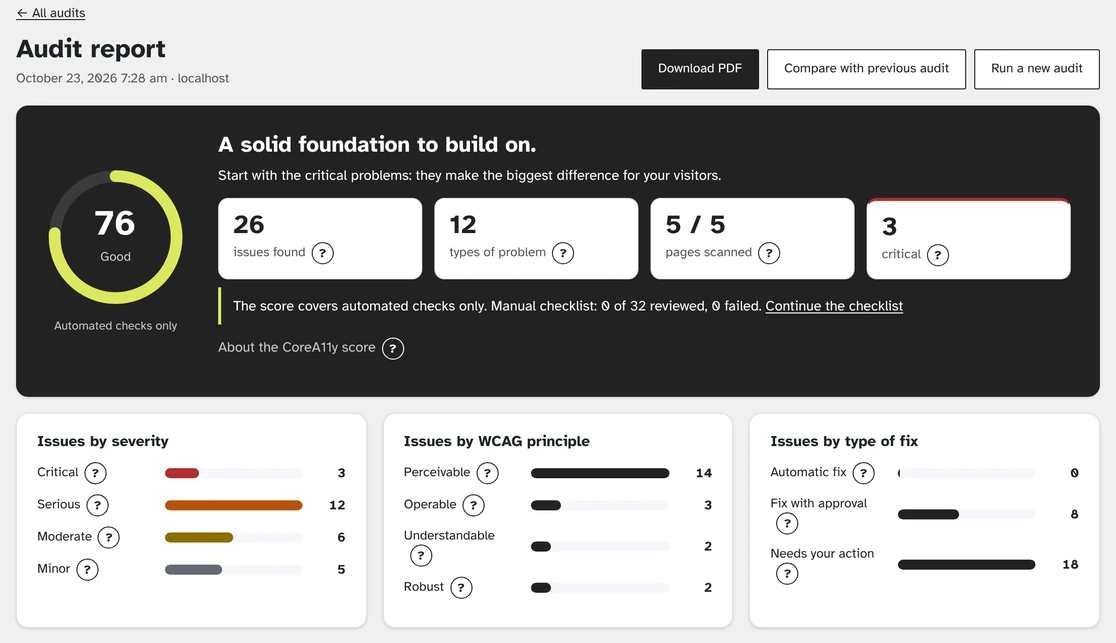
CoreA11y audit report: score 76, 26 issues on 5 pages, with charts by severity and type
The CoreA11y audit report, from a test site.

CoreA11y / How it works

Audit. Fix. Prove it.

Every problem CoreA11y finds lands in one of three lanes, so you always know who does what.

  1. Audit every page

    Scan a few key pages or your whole site, right from your site's dashboard. Issues are grouped by WCAG criterion, page and severity.

  2. Available now

    CoreA11y for Wix

    Audit your Wix site, turn on quick fixes and save alt text to your products and blog. On the Wix App Market, free plan available.
    • Quick fixes
    • Clear reports

CoreA11y doesn't just audit. It fixes the code your visitors get.

Many checkers stop at a list of problems. CoreA11y repairs what is safe to repair in your site's markup, queues the rest for your approval, and guides you through the few things only a person can do.

CoreA11y / Audit report

A report anyone on your team can read

A score, the problems that matter most, and a "?" beside every term that explains it in plain language.

CoreA11y audit report: score 76, 26 issues on 5 pages, with charts by severity and type
The CoreA11y audit report, from a test site.

CoreA11y / How it works

Audit. Fix. Prove it.

Every problem CoreA11y finds lands in one of three lanes, so you always know who does what.

  1. Audit every page

    Scan a few key pages or your whole site, right from your site's dashboard. Issues are grouped by WCAG criterion, page and severity.

  2. Fix in three lanes

    • Automaticsafe fixes, one click
    • Your approvalreview, then apply
    • Your actionstep-by-step guidance
  3. Re-audit and compare

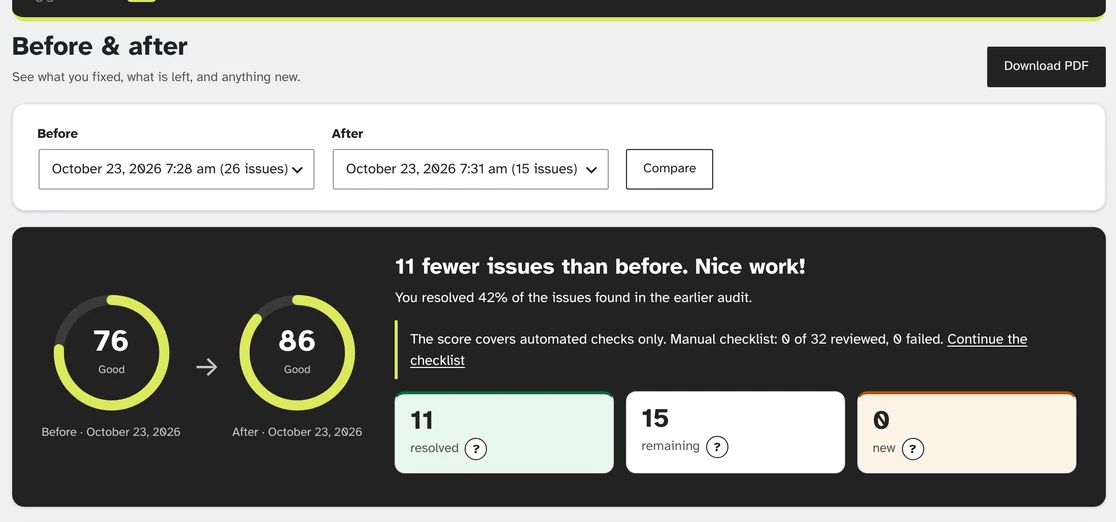
    Run a fresh audit and compare any two. See what you fixed, what remains and what is new, then download it as a PDF.

Before and after: score up from 76 to 86, 11 issues resolved, 15 remaining, 0 new
Compare any two audits Resolved, remaining and new issues side by side. Download it as a PDF for your team or client.

CoreA11y / Undo

Every fix comes with an undo

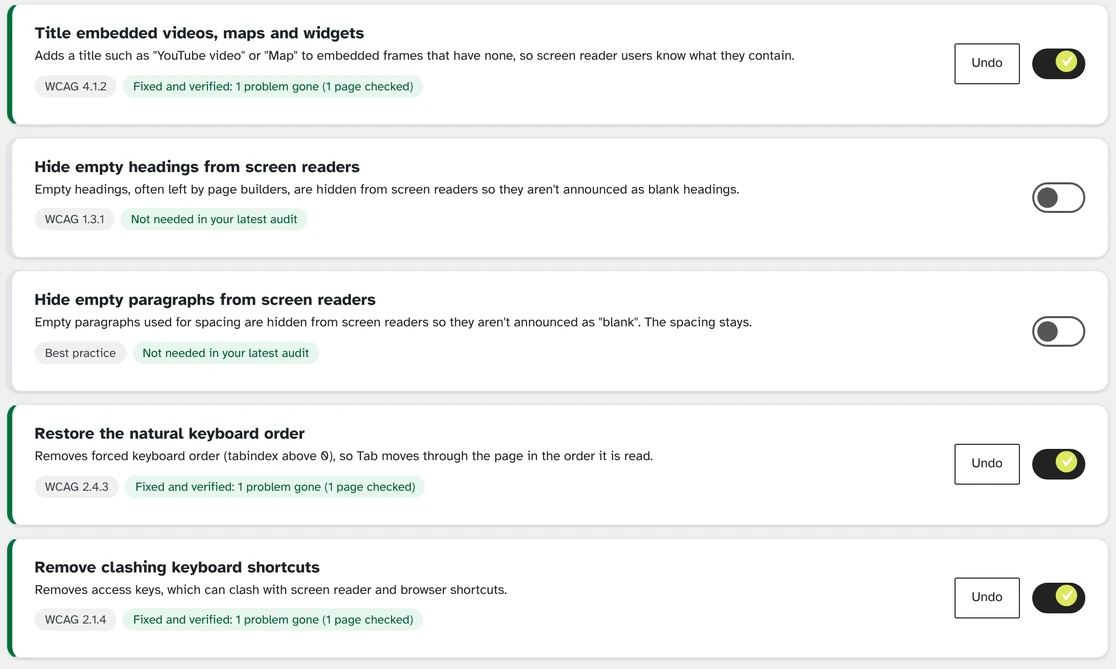
Fixes never rewrite your theme or content. They apply as pages are shown, and every change is logged. Undo one fix, undo a whole batch, or redo an undo.

How quick fixes work
Quick fixes screen: three fixes on, each marked Fixed and verified, with Undo buttons

CoreA11y / Free version

Everything you need to start. Free.

See every feature

CoreA11y / Honest by design

Real fixes, not a widget that hides the problem

Free tool · Digital Compliance Compass

Which compliance rules apply to your website?

Enter your website. The Compass scans it, asks a few quick questions, then lists the privacy, cookie, accessibility and selling rules for your country, each with exactly what to change. Free, in about three minutes.

No sign-up needed. Covers Pakistan, the US, UK, EU and 14 more countries.

Questions

Does CoreA11y make my site WCAG compliant?

No tool can guarantee compliance or prevent legal claims, and we never claim to. CoreA11y finds and fixes what automated testing can, guides you through the manual checks that need a person, and keeps a record of your progress, which lowers your risk.

Do quick fixes change my theme or content?

No. Fixes apply as pages are displayed. Turn one off and your site is exactly as it was.

Does CoreA11y send my data anywhere?

No. Scans run in your own browser and results stay on your own site.

Which platforms does CoreA11y support?

WordPress, Squarespace and Wix today (CoreA11y for Squarespace, CoreA11y for Wix). CoreA11y for Shopify, PDF Remediation and Mobile App Audit are coming soon. See all products and join the waitlist for the one you need.

What is the difference between the free version and Pro?

The free version audits, explains and applies 12 safe fixes. Pro adds 29 more fixes, colour-contrast fixes you approve and a weekly check, plus CSV export, network tools and white-label reports on the bigger plans. Both have undo for every fix.

Run your first audit in two minutes

Free plans on WordPress, Wix and Squarespace today. Shopify, PDFs and mobile apps are on the way.