CoreA11y for WordPress / Features
Find it. Fix it. Undo it. Prove it.
CoreA11y doesn't just audit. It fixes the code your visitors get, and every fix comes with an undo. Here is everything it does, from the first scan to the report you hand your client.
01 / Find
An audit you can actually read
Built on axe-core, the open-source engine trusted by accessibility teams. Results are grouped so you see the biggest wins first.
Three layers of checks
axe-core, selected IBM Equal Access rules and CoreA11y's own checks, mapped to WCAG 2.2 A and AA.
Choose your scope
A few key pages, all published content, or your own list of URLs.
Media checks
Finds images missing alt text in your content and uploads.
Score and charts
A score gauge plus charts by severity, WCAG principle and type of fix.
Desktop and phone
Every page is checked at desktop and phone width, so mobile menus and layouts aren't missed.
Needs a human check
Anything the checks can't decide for sure is listed for you to look at, never hidden or guessed.
Best-practice tips
Helpful suggestions like vague link text or skipped headings, kept separate from your score.
02 / Fix and undo
Safe fixes with a full history
Fixes apply as pages are shown, so your theme and content are never rewritten. Every change is logged and can be undone, one at a time or as a batch.
12 quick fixes in Lite
- Skip to content link
- Keyboard focus outline
- Page language
- Allow mobile zoom
- Search and comment labels
- Missing page titles
- Titles for embedded videos and maps
- Hide empty headings
- Hide empty paragraphs
- Natural keyboard order
- No clashing shortcut keys
- Respect "reduce motion"
Pro adds 29 more, 41 in all: icon-only links and buttons named, dropdown menus that open with the keyboard, sound that no longer autoplays, form labels connected and more.
03 / Understand
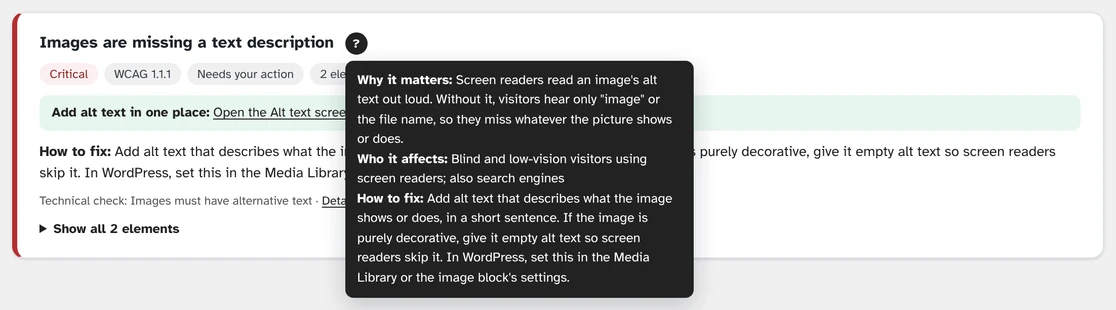
A "?" next to every problem
No jargon. Each explanation says why it matters, who it affects and what to do next.
04 / Prove
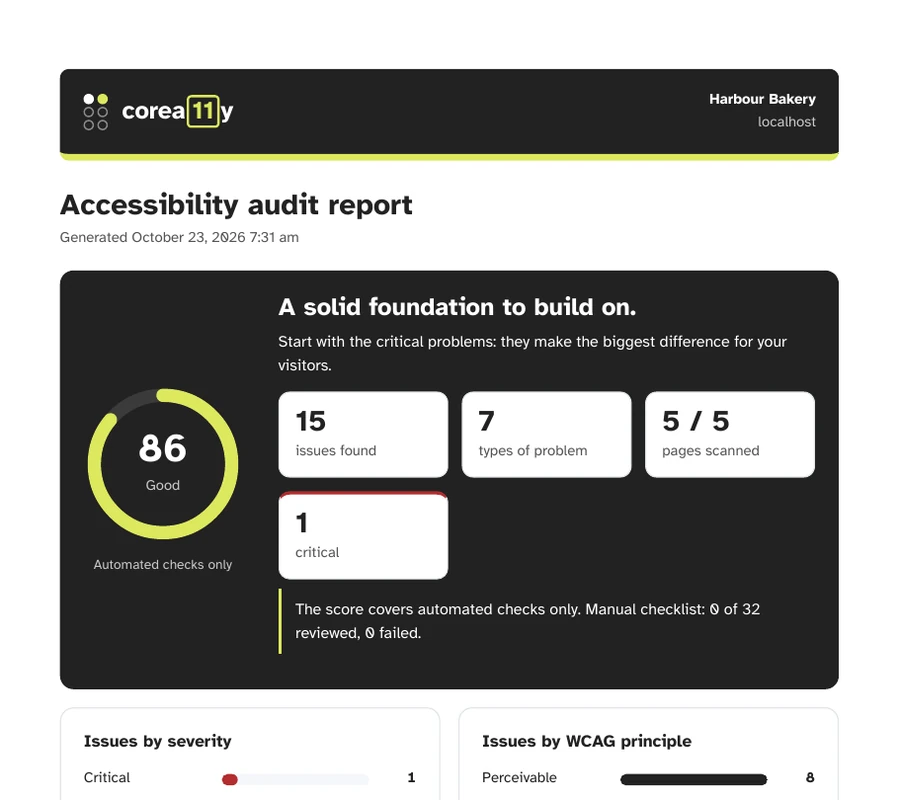
Show your progress to anyone
Before & after
Compare any two audits to see resolved, remaining and new issues.
PDF export
Download any report or comparison as a polished PDF.
Accessibility statement
A live page that updates with each audit. You choose the conformance status.
05 / Everyday work
Built into how you already work
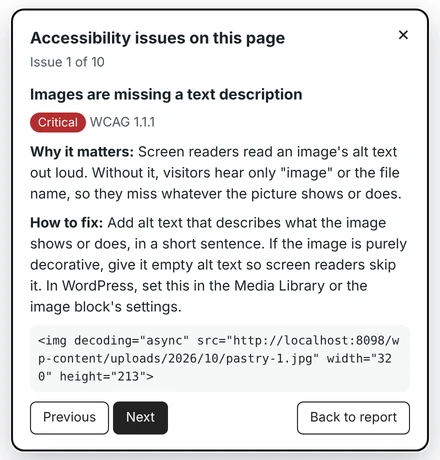
Show on page
Click any issue in a report and CoreA11y opens your live page with the problem outlined, explained, and one click from the next one.
Editor checks
Problems show in your page editor after every save and before publishing.
Admin bar count
See how many issues the page you're viewing has, at a glance.
Dismiss with a reason
Mark false positives. Dismissals carry over and can be restored.
32-step checklist
Step-by-step help for everything software can't judge, from keyboard use to zoom and captions.
06 / Built light
Accessible without slowing you down
The heavy lifting happens in your admin. Visitors only get the small fixes you turn on.
- 0measurable slowdown in our page-speed tests
- <2 KBadded to a page with every Lite quick fix on
- 0checking engines or toolbars sent to visitors
- 0theme files edited. Undo removes every trace
Measured on a standard WordPress 7.1 site. Results vary by theme, plugins and hosting.
Lite and Pro at a glance
| Feature | Lite | Pro |
|---|---|---|
| Full-site audit, PDF reports and before & after | Included | Included |
| Three layers of checks, desktop and phone, 32-step checklist | Included | Included |
| Undo for every fix | Included | Included |
| Quick fixes | 12 fixes | 41 fixes |
| Colour-contrast fixes you approve, with undo | — | Included |
| Weekly check and email summary | — | Included |
| Priority email support | — | Included |
| CSV export, multisite network overview, copy fixes to every site | — | Pro Business and Agency |
| White-label PDF reports | — | Agency |
| Platforms | WordPress | WordPress; Shopify, Squarespace and mobile apps (coming) |
Feature questions
How is CoreA11y different from an accessibility overlay?
Overlays add a toolbar on top of your site and leave the underlying problems in place. CoreA11y fixes the code your visitors get and shows you what still needs a person, with no extra script for visitors to load.
How much can automated testing find?
Only part of all accessibility issues, with any tool. In our tests on a public benchmark of 142 known accessibility problems, CoreA11y flagged about half automatically or for a human check. Its 32-step checklist guides you through the rest.
Will a scan slow down my site?
No. Scans and checking engines run only in your admin while you are signed in. In our tests, pages loaded no slower with CoreA11y, and turning on every Lite quick fix added under 2 KB to a page (about 7.5 KB with every Pro fix on).
What if a fix doesn't suit my design?
Undo it. Every fix is logged, and one click puts your site back exactly as it was.
Does CoreA11y use AI to rewrite my content?
No. CoreA11y never sends your content to an outside service. Fixes are rule-based and predictable, and you approve anything that changes what your content says.